When you type a domain name into your browser, you trust that the answer you get back is real. That the IP address for your bank is actually your bank's. That the mail server for your business is actually yours. Most of the time it is, but the original DNS was designed in the 1980s with no way to prove it. DNSSEC fixes that.
In this post, we'll explain what DNSSEC does, what it doesn't do, and how to decide whether to turn it on for your domain.
The problem: DNS answers can be forged
DNS works like a giant phone book. Your computer asks a resolver, usually run by your ISP or a public service like 1.1.1.1 or 8.8.8.8, "Where is dynu.biz?" The resolver finds the answer and hands it back.
The weakness is that nothing in a plain DNS answer proves it came from the domain's real nameservers. An attacker who can inject a fake response, a technique known as
DNS spoofing or
cache poisoning, can quietly send visitors to a lookalike website or redirect email to a server they control. And because the fake answer gets cached, it can affect many users at once.
What DNSSEC does
DNSSEC (DNS Security Extensions) adds
digital signatures to your DNS records. When a resolver that validates DNSSEC receives an answer, it checks the signature. If the record has been tampered with, the signature won't match, and the resolver throws the answer away instead of passing it on.
It works through a
chain of trust:
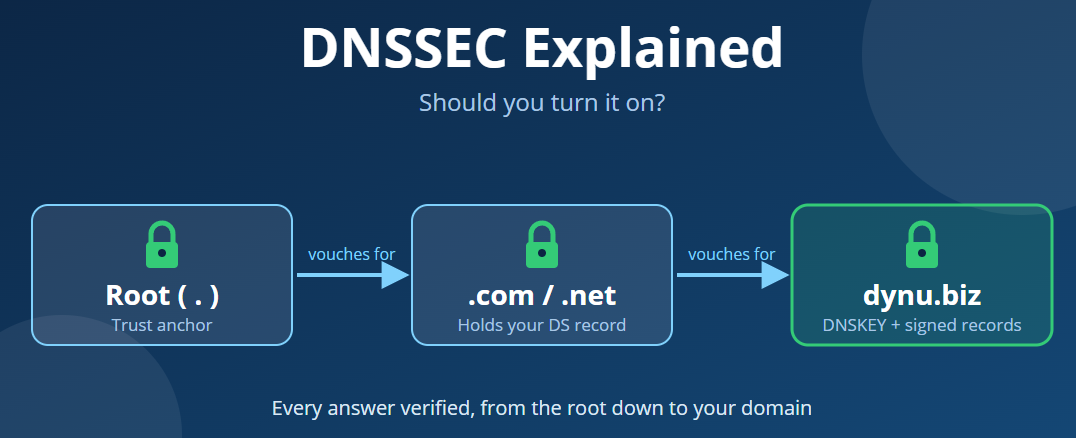
Your DNS provider signs your zone's records with a private key and publishes the matching public key in a DNSKEY record.
A fingerprint of that key, called a DS (Delegation Signer) record, is stored at the registry for your domain's extension, such as .com or .net.
The registry's own zone is signed and vouched for by the DNS root, whose key resolvers already trust.
So a resolver can follow the chain from the root, to .com, to your domain, and confirm every step is authentic.
What DNSSEC does not do
This is where a lot of confusion comes from, so it's worth being clear:
- It doesn't encrypt anything. Your DNS queries and answers are still visible on the network. DNSSEC proves authenticity, not privacy. For privacy, look at DNS over HTTPS (DoH) or DNS over TLS (DoT).
- It doesn't replace SSL/TLS. You still need an SSL certificate for your website.
- It doesn't stop DDoS attacks or protect a hacked account. If someone logs into your DNS account and changes your records, DNSSEC will happily sign the new ones. Strong passwords and two-factor authentication still matter.
Why you might want it
- Protection against spoofing. Visitors using validating resolvers, which today includes Google Public DNS, Cloudflare's 1.1.1.1 and many ISPs, are protected from forged answers for your domain.
- Email security. DNSSEC is required for DANE, which lets mail servers verify TLS certificates using TLSA records published in DNS. That protects email in transit against downgrade and interception attacks.
- Trust and compliance. Some organizations, government bodies and security audits expect DNSSEC on business domains.
- It unlocks newer DNS features. Records like TLSA, SSHFP and OPENPGPKEY are far more useful when they're signed.
Why you might hold off (for now)
DNSSEC is very reliable once it's set up, but it has one sharp edge:
if the DS record at the registry doesn't match the keys at your DNS provider, your domain will stop resolving for anyone using a validating resolver. To those users, your site and email will look completely down.
This usually happens in one situation:
changing DNS providers. If you move your nameservers without first removing or updating the DS record, the chain of trust breaks.
So you may want to wait if:
- You're about to move your domain or nameservers to another provider.
- You manage DNS across several providers and aren't sure all of them support DNSSEC.
Otherwise, for most domains, the benefits outweigh the risks.
Does DNSSEC work with Dynamic DNS?
Yes. When your IP address changes and your hostname is updated, the new record is signed automatically. You don't need to do anything differently.
How to turn on DNSSEC at Dynu
Enable DNSSEC for your domain. Log in to the
Dynu Control Panel, open your domain under DNS Services, and turn on DNSSEC. We'll sign your zone and generate the keys.
Add the DS record at your registrar. If your domain is registered with Dynu, this is done for you. If it's registered elsewhere, copy the DS record details (key tag, algorithm, digest type and digest) from the Control Panel and add them at your registrar.
Verify it's working. Use a tool like
DNSViz or the
Verisign DNSSEC Debugger and enter your domain, for example dynu.biz. A green chain from the root down to your domain means you're protected.
Moving away later? Remove the DS record at your registrar first, wait for it to expire from caches (typically a day or two), and only then change your nameservers.
The bottom line
DNSSEC won't make your domain invisible to attackers or encrypt your traffic, but it closes a real gap: it makes sure the answers people get for your domain are the ones you published. For most domain owners who aren't planning a DNS move, it's a simple setting that's worth turning on.
Have questions about DNSSEC or DNS records?
Contact our support team. We're happy to help.





 DNSSEC explained: should ...